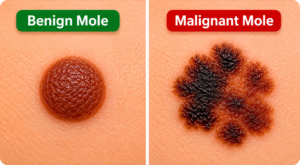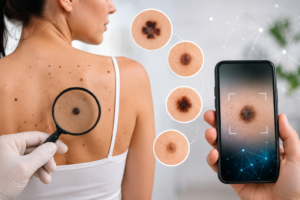

An online mole check is a photo review. You take a picture of a mole or lesion, upload it, and a model returns screening insights about visible patterns. It can help you notice something worth discussing. It cannot tell you that a mole is cancer, cannot replace a dermatologist, and SkinToScan does not offer automatic comparison of the same mole across dates.
What a photo check can do
A sharp, well-lit image can show shape, border, and color mix in that moment. SkinToScan looks at those pixels and returns a screening result. That is useful as a structured first look when you already intend to pay attention to a spot.
Start the upload flow on the health analysis tool. The product is for adults 18 and over. It is not an emergency service.
What it cannot do
- Diagnose melanoma or any other skin cancer.
- See the rest of your body, feel the lesion, or perform dermoscopy.
- Track the same mole over months inside the product. If you keep your own photos, that is your record — not a built-in timeline feature.
- Override what you see in the mirror. If the mole is changing, bleeding, or unlike your other moles, book a clinician even if a screen looks calm.
How to take a usable photo
- Use daylight or even indoor light. Avoid harsh flash that washes out color.
- Fill the frame with the mole, in focus, without blur from movement.
- Keep the camera square to the skin so the shape is not skewed.
- Do not crop so tightly that the border disappears, and do not hide the spot under hair, lotion, or clothing.
- One clear still image is what the tool reads. A blurry or distant shot is not a check.
When to go to a clinician instead of (or after) a photo
Use the ABCDE guide for the visual language (including that melanoma can be smaller than 6 mm). For timing — what to book soon versus what is slower change — see when you should worry about a mole.
The AAD’s ABCDEs of melanoma page is the same public source: new, changing, itching, or bleeding spots should be examined in person.
Book a clinician if
- The mole is changing in size, shape, or color
- It itches, bleeds, or will not heal
- It looks unlike your other moles
- You are unsure — uncertainty is a reason to be seen, not to wait on another photo